Linkus Softphone: 13 Popular Features
Linkus softphone is the mobile and desktop client for Yeastar PBXs. The thirteen items below are a checklist of commonly used capabilities; check vendor notes for version and platform differences.
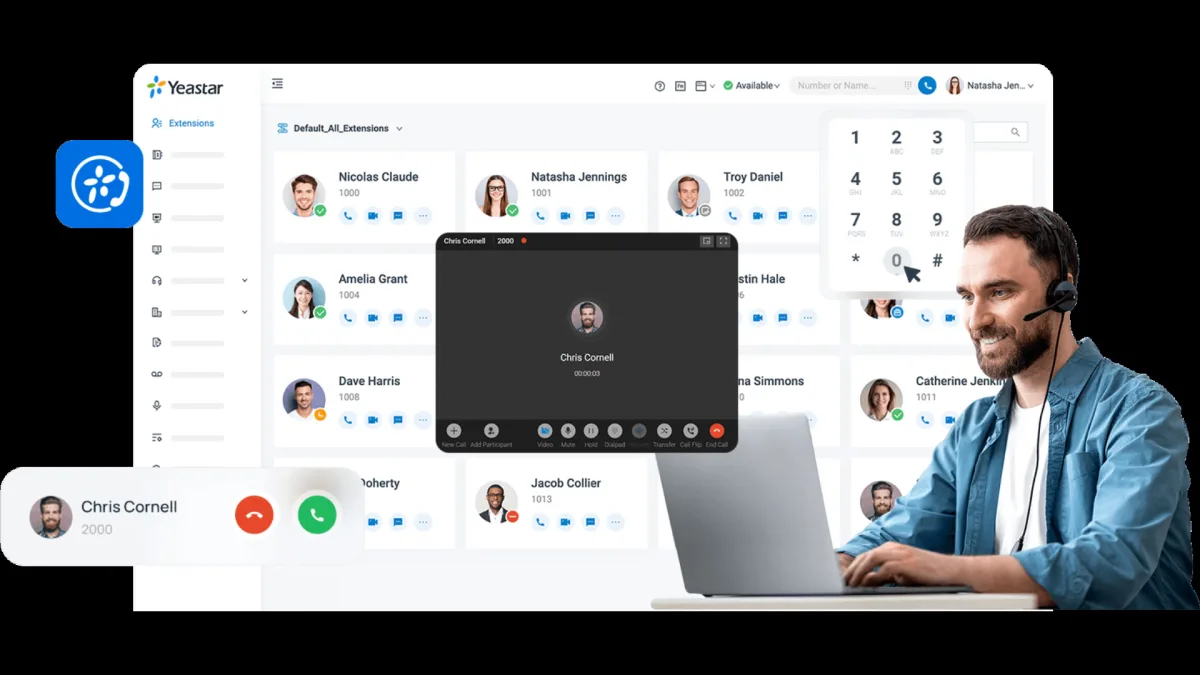
Linkus softphone is the client app that lets Yeastar IP PBX users work like an extension on desktop and mobile. iOS, Android, Windows, and macOS clients can share the same extension identity so office IP phone and road softphone deliver one-number experience. The 13 features below are not marketing fluff; they are a checklist of what field and support teams ask about most. License package, PBX version, and OS updates can change behavior—review vendor release notes and run a short pilot before production. Softphone depends on VoIP network quality; on weak Wi‑Fi, desk IP phones should be the backup.
13 commonly used Linkus softphone features
The list does not mean “enabled in every deployment.” Some items (recording access, agent view, CRM) need permissions, extra licenses, or server configuration. Rollout should also cover MDM profiles, certificate pinning, STUN/TURN, and push notification permissions in discovery.
- SIP registration / extension identity: client matched to PBX extension; check registration conflicts in multi-device scenarios.
- Inbound and outbound calls: basic voice; codec choice and speaker/headset routing affect user experience.
- Presence (available / busy / DND): team visibility; wrong presence can break queue distribution.
- Chat / instant messaging: internal messaging varies by version; archive policy should be defined separately.
- Call history: missed/answered logs; privacy and retention follow company policy.
- Directory and LDAP / directory bridge: corporate directory search; sync frequency matters for large directories.
- Call transfer and hold: attended / blind transfer; test IVR post-transfer scenarios in pilot.
- IVR / queue agent view: queue status depending on license; critical for call-center agents.
- Mobile push notifications: incoming call alerts in background; test OS limits and battery optimization.
- Desktop client: fixed-line experience on Windows / macOS; headset integration matters at the desk.
- CRM / click-to-call bridges: per supported CRM list; API keys and permission model managed separately.
- Call recording access: listen/download per permission; do not enable without privacy notices and policy.
- Multi-device / hybrid use: phone + softphone together; ring strategy defines which device rings.
Network, security, and deployment
Enterprise rollout is not only “download the app.” Guest Wi‑Fi outside VLAN, VPN split tunnel, and UDP media behind NAT are frequent root causes. Remote offices fail without SIP/RTP openings on SBC or firewall. Expired certificates drop registrations; add monitoring and renewal calendar to operations. BYOD may put corporate directory on personal phones—a data-classification decision.
When softphone, when desk phone?
Field staff, warehouse, and frequent travelers benefit from softphone. High-call-volume desk roles still see less friction with physical keypads and wired headsets. Hybrid—IP phone on critical desks, Linkus on mobile—is balanced in many Yeastar deployments. As softphone count grows, recalculate concurrent-call licensing on the PBX.
Limits and pilot suggestion
The feature list summarizes product capability; reality shows in pilot. A one-week pilot: two desktops, two mobiles, one queue agent, and one CRM click-to-call scenario is enough. Measure: registration time, first-ring delay, transfer success rate, and missed push count. In short, Linkus is the softphone layer in the Yeastar ecosystem; the 13 items are a checklist, not an unlimited-feature guarantee.
Related Posts

Parasut Pre-Accounting App: Gift Invitation
Run invoicing, collections, and reporting more easily with Parasut. Use the invitation link for three months free....
Sangoma signs definitive deal to be acquired by BRC Group
On 28 September 2026 Sangoma announced a definitive agreement with BRC Group Holdings at about US$204 million enterprise value; closing is aimed for e...
What Is TR-069?
TR-069 is the CWMP standard ISPs use to remotely configure, monitor, and update customer premises equipment (CPE) via an ACS....