Yealink MP E2 Teams Phones Coming to Market
Yealink announced MP E2 series Teams phones (MP52–MP58 E2). Android 13 desk phones and office UC scenarios.
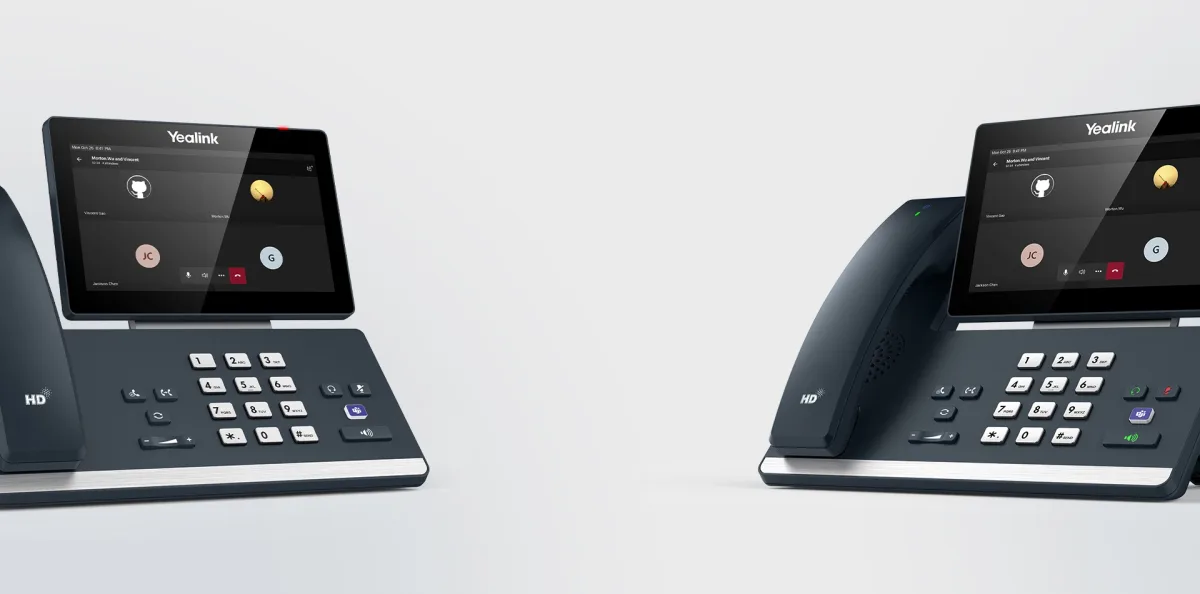
Yealink announced the MP E2 desk phone family for Microsoft Teams: MP52 E2, MP54 E2, MP56 E2, and MP58-WH E2. The slug phrase «coming to market» refers to this launch. Devices are based on Android 13; Teams native experience, security updates, and management (RPS / PnP) expectations are updated versus the previous MP generation. Firmware version, Teams certification, and regional stock depend on manufacturer and channel notes — confirm certification list and stock before ordering.
What changes on MP E2 Teams phones?
The E2 update is not chassis refresh alone. Android 13 promises a longer support window for app and security patches; devices with aging OS fall outside policy in corporate fleets. The model range splits by screen size, touch experience, and wireless variant (MP58-WH E2) for office roles: basic desk user, heavy calling teams, manager / open office scenarios. In Teams Phone / Direct Routing, the device is managed like a Teams client, not like a «SIP phone»; account assignment, policy, and firmware channel align with Microsoft + Yealink management tools.
Model family and use
- MP52 E2 / MP54 E2: compact desk; basic Teams calling and contacts experience.
- MP56 E2: larger screen; heavy calling and visual UI needs.
- MP58-WH E2: wireless handset variant; short movement away from the desk.
- Common: Teams native UI, headset/USB accessory ecosystem, automatic provisioning expectation.
Headset, camera, and room systems are chosen separately; a desk phone alone is not a meeting room solution. For Zoom / SIP-only PBX, classic Yealink T or SIP series is evaluated separately — treating MP E2 as «IP phone for every PBX» is wrong positioning. On E2 migration, mark warranty and firmware end dates for old MP devices in inventory; when two generations sit side by side on the same desk, user support cost can double. Procurement should combine license (Teams Phone) and hardware in one request; otherwise devices arrive and numbers cannot be assigned.
Who is it for, when?
Offices using Teams Phone, Calling Plan, or Direct Routing are the natural target. In hybrid work, desk device + soft client combination is common; number and queue policy must stay consistent for the same user. Purchase checklist: Teams certification (model + firmware), PoE / power plan, VLAN (voice), DHCP option / RPS, account lifecycle (hire / exit). Pilot with 5–10 devices first; replacing the whole office the same day magnifies firmware or tenant policy surprises.
SIP vs Teams distinction
Existing Yealink SIP estate (T4x / T5x) registers to IP PBX trunk; MP E2 connects to a Teams account. Both worlds can coexist (transition period) but management, numbering, and user training are separate. Summary: MP E2 is a Teams desk phone generation update; Android 13, model variety, and native Teams experience stand out. See Yealink for the product family and IP phones for office endpoints; Teams infrastructure is planned separately. Aligning firmware policy with tenant update windows reduces surprise UI changes.
Related Posts